Changelog
What's new in Arrival
New features, improvements, and fixes across every release.
v2.0.1
#
Bug Fixes
- The App Store copy could sit idle with no drive times. If you had pinned your home or work address with Use My Location in the direct download, the App Store copy brought the pin across but not the location behind it, and then never looked the address up. Arrival now drops a pin that has no location, looks the address up again, and starts checking traffic
v2.0.0
#
New Features
- Arrival is on the Mac App Store. The same app, sandboxed for the store, alongside the direct download. Both channels ship this version
- Send Feedback. A bug report or an idea, written and sent from inside Arrival. Open the ellipsis menu in the popover and pick Send Feedback. No mail client, no web form, nothing to abandon halfway. Leave the box ticked and the last 15 minutes of activity ride along, scrubbed of addresses and coordinates. The email field is optional; fill it in if you want a reply
Improvements
- Route directions open in Apple Maps by default. It was Google Maps. Apple Maps needs nothing installed, and it is already where your drive times come from when you have no Mapbox key. If you picked one yourself, Arrival leaves your choice alone
- A quieter first run. Setup comes first now: the location prompt waits until you have both addresses in, and the diagnostics question waits until you have finished setting up. Neither is asked twice
Bug Fixes
- "Start at login" could get stuck on. If you removed Arrival from System Settings → General → Login Items, the toggle in Arrival still claimed it was on and refused to switch off. Arrival now checks the real registration instead of assuming
Notes
- Switching from the direct download. The App Store copy picks up your settings from 1.9.0 or later. It asks for your home and work addresses and your Mapbox key once, on first run. Those live in your keychain, whose items are bound to a code signature, and the two copies are signed by different certificates, so they cannot travel between them. Drive times work immediately from Apple Maps with no key
- The direct download keeps its updater. App Store apps may not ship their own, so automatic updates, the Check for Updates button and the beta channel appear only in the direct-download build
- Diagnostics go to one place now. Usage counts and crash reports both go to PostHog. The consent switch and the scrubber work exactly as before, and Settings → Privacy names every destination
v1.9.0
#
New Features
- Desktop widgets. Small, medium and large. The small one is your drive time and when you'd get there. The other two chart the commute as it happens, and the large one adds your alternates and any incidents. Between commutes they name your next window and grey out the last drive
- A rebuilt Settings window. A sidebar and standard macOS controls, the way System Settings looks. The old tab strip is gone, and the developer tools moved in as their own pane
- A rebuilt Traffic Map. The map fills the window now, with one floating panel for your time, delay, ETA and alternates. Incidents finally show as pins, colored by how bad they are
- An optional Dock icon. Off by default. Turn it on under General, and clicking it opens the map
- Mapbox attribution. "Traffic provided by Mapbox" now appears wherever their data does. Their license asks for it
Improvements
- ⌘, opens Settings, from any Arrival window, the way it does in every other Mac app
- The Get Premium Access button is gone. There was no premium tier behind it, and a free Mapbox key gets you the same data
- Twice as many mood phrases, 179 of them, so "Buckle up, buttercup" comes round a lot less often
v1.8.0
#
New Features
- The notch HUD. Arrival can live in the notch instead of hiding in the menu bar. A quiet bar during your commute window, a full readout with your ETA and mood on hover, and the whole popover on click. No notch on your Mac? You get the same HUD as a pill at the top of the screen. Off by default — turn it on in General
- The HUD knows when you've arrived. Park at work and it takes itself away for the rest of the morning window, instead of insisting you still have 22 minutes to go. Head home in the evening and it comes back on its own
- Commute days. Mark which days you actually drive in Schedule, so the HUD and the direction switching stay quiet on the days you work from home
- "Use Where I Am" for your addresses. Pins your exact spot instead of a geocoded guess. A typed address can land on a city centroid a couple of kilometres from your real desk, and no amount of tuning fixes a wrong point
- Opt-in beta updates. Flip "Receive beta updates" under Developer to get builds before general release. Stable releases still reach you either way
Improvements
- Times now read in 12-hour form throughout the app, rather than following the system 24-hour setting
- The mood phrase is identical everywhere it appears — popover, HUD peek, and HUD expanded
Bug Fixes
- Turning diagnostics off now stops usage data immediately. It closed the crash reporter but left the analytics client running, so anything already queued still went out after you said no
- Errors now say what actually went wrong. A rejected Mapbox key told you that you were offline, and Preferences went on claiming the key was active. Both now read "Key rejected", along with distinct wording for rate limits, missing routes, and addresses that can't be found
- The notch HUD admits when it's stale. If polling has been failing, the dot greys out and the hover pill reads "Not updating", instead of asserting a mood and an arrival time it can no longer back up
- Diagnostic exports now scrub coordinate pairs written with three decimals — roughly 100 metres, still enough to identify a home or a workplace
- The mood badge no longer clips away its own pulse dot when the layout momentarily squeezes it
v1.7.4
#
Bug Fixes
- The menu-bar popover now reliably resizes to fit its contents — the empty white space that could appear under the footer, when the popover dropped from several routes to one or after collapsing the inline map, is gone for good
v1.7.3
#
Bug Fixes
- The menu-bar popover now shrinks back down when its contents get smaller between opens — dropping from several routes to one no longer leaves empty space under the footer
v1.7.2
#
Bug Fixes
- Fixed empty strips appearing above the header and below the footer of the menu-bar popover — the background now fills the popover edge to edge
v1.7.1
#
Bug Fixes
- Tapping a route to view its map inline now grows the popover correctly instead of letting the map bleed outside the popover frame
v1.7.0
#
New Features
- Smarter traffic moods — going yellow or red now requires actually losing time (default +5 minutes over your baseline), not just a ratio. A commute faster than your baseline can never read as "sluggish", and short commutes no longer flip yellow over a couple of noise minutes
- New "Floor at" slider in Mood Tuning to adjust how many minutes of delay it takes before the mood leaves green
- Hover the mood badge to see exactly how the mood was computed — current ETA, your baseline and where it came from, the ratio, and the thresholds
- New "Why this mood?" panel in Developer Settings showing the live mood derivation
- The mood badge now celebrates when you're ahead — "Smooth sailing · 14 min ahead"
- First-run privacy consent — Arrival now asks before sending anonymous usage stats or crash reports. Nothing leaves your machine until you answer, and the choice stays editable in General → Diagnostics
Improvements
- Route card colors, row highlights, and route lines now always match the mood badge (previously some were stuck on green)
- Major internal rebuild for reliability: a single polling loop that can't fire overlapping requests, an overhauled settings engine, and clearer provider error handling throughout
- Settings writes are batched, so rapid edits in Preferences no longer thrash disk and keychain
Bug Fixes
- Fixed a launch-sequence race that could leave the menu bar icon stale after login
- Fixed a rare hang when decoding malformed provider responses
- Dev-mode fetches are serialized so rapid dev-tool actions can't race each other's results
v1.6.3
#
New Features
- Diagnostics layer for actionable bug reports — the app now records a trail of what it was doing (lifecycle, permissions, network, polling, direction changes, updates) so silent failures actually surface
- New Settings toggle for anonymous diagnostics, plus a Settings-tab exporter that copies a redacted diagnostic bundle to your clipboard for filing issues
Bug Fixes
- "Automatically check for updates" toggle in Preferences now reflects its real state instead of appearing stuck
- Diagnostic exports now include info-level entries in Release builds (previously they vanished before they could be captured, leaving bug reports nearly empty)
- Auto-updater no longer nags users who are already on the latest version. The bundled build number is now tied to the marketing version, so Sparkle can correctly tell when you're up to date
- Scheduled direction windows now beat proximity. If you're working from home at 4pm and your schedule says "go home," the app flips to route-to-home instead of staying pinned to route-to-work
- Fixed location permission check that prevented proximity detection from firing for anyone who granted "when in use" access
- Direction is re-evaluated on a 60-second tick and on wake from sleep, so schedule-window transitions aren't missed between route polls
v1.6.2
#
Improvements
- Mood Tuning sliders now update the menu bar live — tweak a weight or threshold and the effect is visible immediately, no refresh needed
- Preferences now speaks in minutes: threshold sliders show
+X min · Y% slowerhints and the gradient bar has a green / yellow / red legend with minute ranges - Each weight slider has a plain-language hint describing what it measures
- A note appears under thresholds when non-delay weights are active so minute estimates aren't read as exact
- Delay sub-score saturates a touch sooner (at 40% over baseline rather than 50%), so big delays drive the mood harder
v1.6.1
#
Bug Fixes
- Removed the "Compare to" toggle — recalibrated commutes during rush hour no longer read as "Clear" when traffic is actually slowing you down. Your best-case baseline is now always used, falling back to provider typical only when you haven't calibrated.
Improvements
- Durations over an hour now render as
1h 5m(inline) or1:05 hr(hero) instead of65 min - Smoother sliders in Preferences — continuous motion and fewer redraws while dragging
- "TRAFFIC COMPARISON" section in Preferences renamed to "BASELINE" with clearer copy about what the value means
v1.6.0
#
New Features
- Richer traffic incidents — surface type (accident, construction, closure, weather, etc.), closures, affected roads, and blocked lanes from Mapbox
- Default mood scoring to delay-only for a simpler out-of-the-box experience (existing users are migrated automatically)
Improvements
- Mood Tuning moved into a collapsed Advanced section to reduce clutter in Preferences
- Per-weight cap raised to 100% so a single signal can drive mood on its own
- Active route's travel time now uses its own mood color instead of a fixed green
v1.5.1
#
Bug Fixes
- Fix route list flickering on refresh with stable content-based row identity
- Fix Mapbox alternatives parameter to return all available routes
- Scope animation to mood changes only, preventing unwanted animations on travel time updates
Improvements
- Use Canvas rendering for congestion line segments for smoother drawing
- Extract shared incident color and status row helper into design system
v1.5.0
#
New Features
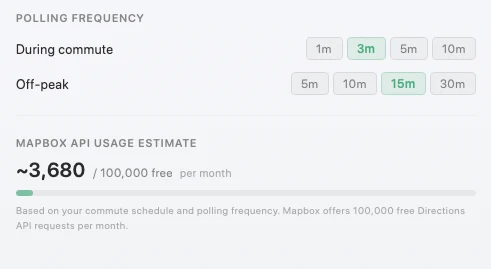
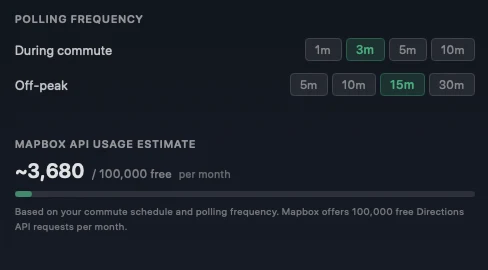
- Show estimated monthly Mapbox API usage in preferences
- Add changelog page to the website
- Add delight touches to landing page
Improvements
- Batch UserDefaults writes to reduce per-keystroke disk I/O
- Move analytics signals off the main thread
- Cache map coordinate conversions and skip redundant map redraws
- Batch consecutive congestion segments into single polylines for smoother map rendering
- Cancel duplicate in-flight route fetch requests
- Cache mood computation to avoid redundant recalculation
- Overhaul landing page design and copy
v1.4.6
#
New Features
- Add Vercel Web Analytics to landing page
Bug Fixes
- Enable Sparkle auto-updates with EdDSA signing
- Add EdDSA signature for v1.4.5 in appcast
- Add EdDSA signatures to appcast for Sparkle updates